Financial controls for AI

Every call.Every agent.Accounted for.

CoreValue checks every model, tool and agent call against your budgets and customer margins before it runs, records every dollar against the team and customer it served, and shows what that spend returned.

Example
  • Decided before the callBudgets, customer margins and tool access
  • Recorded at the callEvery dollar by team, customer, agent and run
  • Proven afterMargin, chargeback and return on AI spend
The Overview

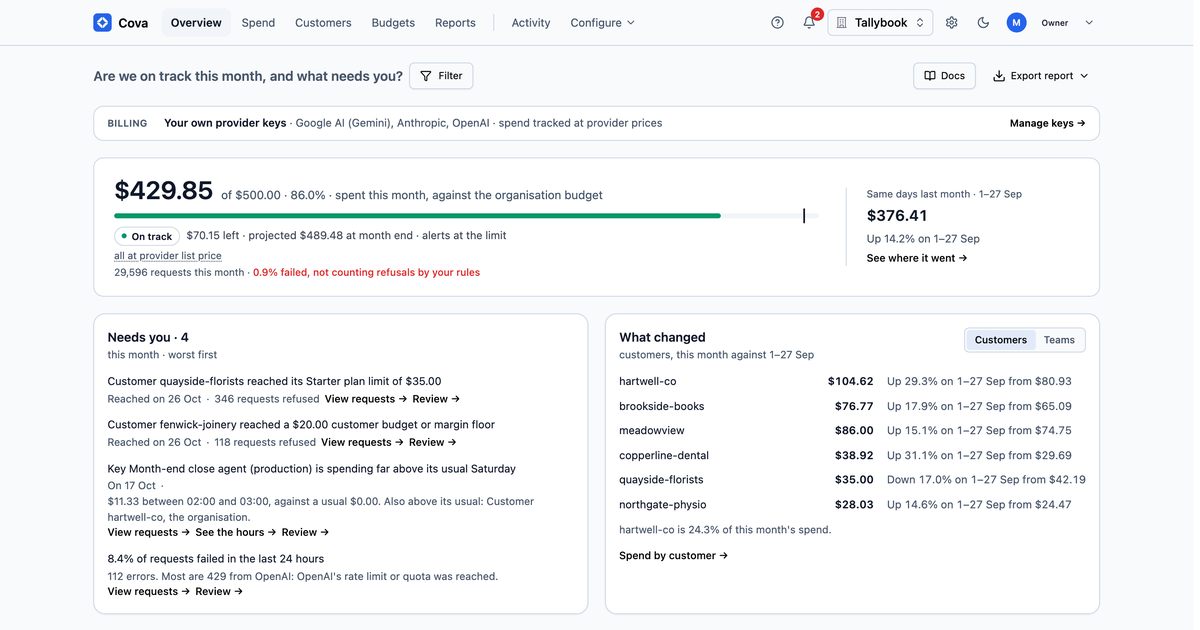
One page answers it: are we on track this month, and what needs you?

This month against your budget, what needs action worst first, what changed, and how many requests failed.

The CoreValue Overview: this month's spend against the organisation budget, Needs you, and What changed
Demo organisation, sample data.

Decided before the call, not discovered after.

Most tools see AI spend after it happens. CoreValue sees each call before the money is spent, and knows both what it costs and what your customer pays you.

  1. 1

    Reserve budget

    Hold the maximum estimated cost against every budget that applies: organisation, team, member, API key and customer.

  2. 2

    Apply your rules

    Allow or block, switch to a cheaper model, or alert. Start with alerts to see what a limit would catch, then switch it to block.

  3. 3

    Settle the actual cost

    Record what the call cost and release the unused hold, including when a stream is interrupted.

Built for companies putting agents to work.

Whether AI is in the product you sell, or in how your teams work.

SaaS companies

You sell a product that calls AI models.

Protect your margins as customers use more AI.

  • Set a separate AI budget for each customer
  • Compare the cost of serving each customer with the revenue they bring in
  • Set margin thresholds that alert you or block further requests
AI-native teams

Your teams build and work with AI every day.

Give every team, and every agent, its own spending limit.

  • Team budgets that block, switch to a cheaper model, or alert
  • A spending cap on each API key, so each developer or agent can have its own
  • Costs by team, person and agent run, and a monthly chargeback for finance
What you get

Decided. Recorded. Proven.

Every model, tool and agent call is checked before it runs, recorded against the team and customer it served, and set against what it returned.

  1. 01

    Controls come too late

    Decided

    Stop overspend before the call reaches the provider.

    Keep AI spend inside your budget and your margin as usage grows, with every check made before the model is called.

    • Budgets for the organisation, each team, member and customer, and caps on keys, that block, switch to a cheaper model or alert before the model is called
    • Daily and yearly ceilings beside the monthly budget
    • Spend-rate limits and per-session caps that stop a runaway agent loop (on your own provider keys they alert, not stop)
    • PII guardrails on model requests and MCP tool calls
    • Unusual-spend alerts when an hour spends far more than usual, with nothing refused
    Search team · monthly budget100%
    gpt-4ogpt-4o-miniDowngraded by the team budget
    Example
  2. 02

    Nobody knows who spent it

    Recorded

    See which customers, teams and features drive your AI costs.

    The cost of each AI feature, customer and agent run, by the dimensions your business runs on.

    • Spend by team, customer, feature, agent run and 6 more dimensions
    • Spend by model and provider, with cost per request
    • Spend by agent, from the keys you bind to each agent
    • A month-end forecast, so you see where the month is heading before the bill lands
    • A record of every request a rule refused, downgraded or redacted, and why, and what a rule would have refused before you switch it on
    POST /v1/chat/completions
    team: searchcustomer: acmefeature: summariserun: r_81f2
    claude-sonnet-4 · 2,140 tokens$0.0142
    Example
  3. 03

    Nobody can show it paid off

    Proven

    Connect AI spend to margins and to finance.

    Your margin on each customer against what you charge them, and a month finance can close and check.

    • Monthly chargeback, closed and downloadable for finance
    • Each provider's invoice checked against what CoreValue recorded
    • Margin per customer against what they pay you, with a floor that alerts or refuses below it
    • Return on AI spend against the value you set, and an executive summary
    Acme · this month
    Revenue$4,000
    AI cost$1,240
    Margin69%
    Example

Some controls depend on your plan.

Built for the edge cases

Accounted for, even in the edge cases.

Calls run at the same time, streams get cut off, and several budgets can apply to one call. CoreValue is designed for each of these cases, and has tests for each.

  • Calls at the same time

    Each call reserves its worst-case cost first, so concurrent calls can't overdraw the same remaining balance.

  • A response cut off

    When a client disconnects mid-stream, the call still settles to its real cost and the rest of the hold is released.

  • Several budgets at once

    A call refused by one budget releases what it already held against the others.

Integration

Keep your SDK. Change the base URL.

Connect your existing OpenAI or Anthropic SDK by changing the base URL and API key. You add CoreValue without rewriting your application code.

Models, tools and agents

  • OpenAI, Anthropic, Google and more, through one OpenAI-compatible API or each provider's own SDK
  • Translation between provider formats, model routing and fallbacks
  • MCP and A2A gateways

Security and access

  • Guardrails that redact or refuse personal data
  • Access rules for who may call each MCP tool and agent
  • Custom roles, and single sign-on set up on request
  • An audit log of who changed what

Put every call and every agent on the books.

Decide what each call may spend, record every dollar against the team and customer it served, and show what it returned. Start by changing your base URL.